Sotto Note

Notes as fast as a message.

Type, speak or share from any app: Sotto Note holds on to the thought before it slips away. Your notes stay with you: no account, no server.

Download on the App StoreFor iPhone, iPad and Apple Watch Download on the Mac App StoreFor Mac 7-day trial. One-time purchase from $5.99, no subscription.
Sotto Note on iPhone: a thread shown as a timeline with several entries

Why Sotto?

“Sotto voce” is Italian for “in a quiet voice”: under your breath, almost just for yourself. That is the idea behind Sotto Note. A quiet conversation with yourself where a thought has room before it slips away. The sound wave in the app icon stands for that voice.

A chat with yourself

Notes appear like messages in a conversation. No title, no folder, no blank page. Whatever comes later, you add as a reply.

Speaking counts as much as typing

Thoughts often show up on the go. Say them quietly and Sotto Note turns them into text with paragraphs and lists, keeping the audio too.

Quiet in the background

No account, no server, no ads. Apple Intelligence makes suggestions but never decides without you. Your notes stay with you.

What makes Sotto Note special

As quick as sending a message

No title, no folder. Open it, type or speak, done.

Thoughts from your wrist

Start talking on your Apple Watch. The note lands on your iPhone transcribed, and filed right away if you like.

Trip plan and trip log

Places and routes as maps, tickets as photos, all in one thread. Add your packing list and ideas to it.

Photos you can search

Sotto Note reads text in images. Find the photo of a sign, receipt or menu again through search.

AI that files and learns

Apple Intelligence files notes into collections, adds tags and corrects dictation, on your device. New tags and corrections stay suggestions until you agree.

Open format, no subscription

Your notes are plain Markdown files. Export them any time, including to Obsidian.

What Sotto Note does

You just start writing, without deciding first where a note belongs.

Capture in seconds

Text, link, photo, PDF, map or voice: open a note, write, done. Voice notes keep their audio and are also turned into text.

  • Mac: Cmd-Shift-N opens a quick-capture window above every app
  • Share menu in any app, Lock Screen widget, Action Button and Shortcuts
Capture window with text and a tag suggestion

Thoughts from your wrist

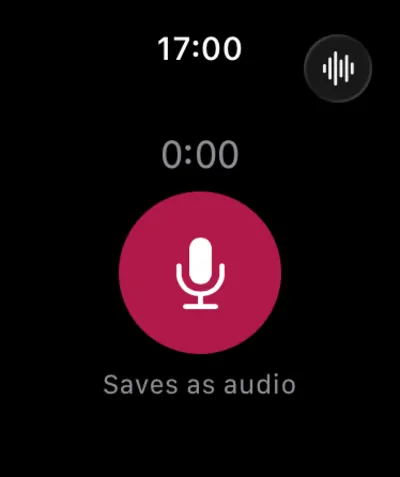
Open Sotto Note on your Apple Watch, tap the record button and speak. The recording arrives on your iPhone and is transcribed there. If the iPhone is out of reach, it waits until the iPhone is back.

  • You choose whether the recording is saved as audio or as text
  • If a collection has a rule, the note can be filed right away
  • On Apple Watch Ultra, the Action Button starts recording through the shortcut “Record on Apple Watch”
Sotto Note on Apple Watch

Threads, not documents

Add more entries to a note later instead of creating new files. A thought grows as a timeline. Threads can be embedded in other threads when topics belong together.

You can also chain notes into a thread afterwards or pull them out again, several at once if you like.

Notes list on iPhone with pinned collections

Trip plan and trip log

One trip, one thread. Attach places and routes as maps and tickets as photos or PDFs, and embed the packing list as a thread of its own. On the way you speak your thoughts. Later you find everything again and export it as Markdown.

Trip thread with a map, a route and a ticket photo

Find text in images

Sotto Note recognizes text and content in photos, right on your device and without Apple Intelligence. That way you find the photo of a sign, receipt or menu again through search. The recognized text also helps file the note.

  • Per photo, the “Use text from image” switch puts the text into the note
  • In the context menu: copy text, add it to the note, recognize it again
  • Can be turned off under “Images” in Settings
Photo in a note with recognized text

Review with a swipe

Three decks walk you through what has piled up: New, Revisit and Rediscover Library. Swipe a card to keep it active, or send it to the Library. The same actions are available as two large buttons.

Review with a deck of cards to swipe

Apple Intelligence, on your device

Sotto Note uses Apple’s language model. You only apply suggestions when you confirm them. Without Apple Intelligence, everything works by hand.

  • Get collection and tag suggestions
  • Correct spelling and dictation errors, with a before-and-after view
  • Reminders from phrases like “tomorrow at 9”
  • Structure voice recordings with paragraphs and lists
  • Obsidian export as a new note with an AI title and tags, or appended to an existing note
Apple Intelligence settings

One app instead of many

Sotto Note is more than a notepad. What you would otherwise spread across several apps lives in one place.

Notes

Type, speak, attach a photo or PDF, and you are done.

Mac excerpt: notes with a photo, a PDF and a voice note in the list

Reminders

Add a reminder to any note. At the chosen time a notification lets you mark it done or snooze it. Write “Remind me tomorrow at 9” and Sotto Note sets it. More in the manual

Mac excerpt: the Reminders filter with three notes and their reminder times

Knowledge base

Collections, tags and threads keep knowledge together. Full-text search also finds the text in photos, and Review brings old notes back up. More in the manual

Mac excerpt: sidebar with collections and tags next to search results

Journal

Capture the day in seconds: quick capture, voice note, Apple Watch or widget. Entries grow as a thread into a timeline. Lock the journal with Face ID or Touch ID. More in the manual

Mac excerpt: diary thread with daily entries as a timeline

Trip plan and travel log

Places and routes as a map, tickets as a photo or PDF, the packing list as its own thread. More in the manual

Mac excerpt: trip thread with a map and a route from the airport to the hotel

Packing lists and checklists

Write lists with checkboxes, also by voice: “Checklist milk next item eggs”.

Mac excerpt: weekend checklist with checked items

To-do lists

Write your tasks as a checklist and tick them off right in the note. More in the manual

Mac excerpt: task list with checkmarks and a reminder

Project management

A project is a thread: meetings, decisions and ideas become entries in the timeline, and you embed sub-topics as threads of their own. Collections and tags sort by client or status. More in the manual

Mac excerpt: project thread with entries and an embedded thread

Recipes

Paste a recipe link and Sotto Note fetches title, image and source. A photo of a cookbook page is read and becomes searchable. Write the ingredients as a checklist and tick them off while shopping. More in the manual

Mac excerpt: recipe with an ingredient checklist and a link preview

And in the details

Speak instead of typing

Recording without switching apps

Start recording with the Action Button, a shortcut or Siri. If the app crashes, the recording becomes a note on the next launch.

Dictation in 25 languages

The optional Parakeet model recognizes 25 European languages automatically and works offline. Without it, the app uses Apple’s speech recognition.

Add structure?

If a recording sounds like a list, Apple Intelligence suggests paragraphs, headings and lists. You see a preview and can undo it.

Organization that thinks along

Collection and tags, kept apart

A note lives in at most one collection, with up to five tags as finer keywords. Pin important collections to the top.

Suggestions that learn

Apple Intelligence suggests a collection and tags, and every suggestion is checked twice. If you change one, Sotto Note shows it to the AI as an example next time.

Share with others

Share a collection or note by invitation, such as a shopping list where everyone ticks things off. The content lives in the owner’s iCloud, with no Sotto Note server. More in the manual

Writing and attaching

Formatting right in the editor

Headings, lists, quotes, bold and italic look the way they should as you type. Notes are saved as Markdown.

Map attachments

Attach your location, a place or a route, by car, on foot, by bike or by public transit. Tapping the map opens Apple Maps.

Mac: keyboard first

⌘↩ saves, ⌥⌘↩ appends to the selected thread, ⌘⌫ moves selected notes to the Trash.

Secure and tidy

Lock with Face ID and Touch ID

Lock single notes or whole collections. Locked notes reveal nothing in lists, search, widgets and notifications.

The Trash tidies itself

Deleted notes are removed for good after a period from 1 day to 1 year. You can also choose “Never”, and the default is 1 month.

Import and export

Back up all notes as Markdown files, one per thread. Import a folder or single .md files, including notes from Obsidian.

At home on every device

One purchase covers iPhone, iPad, Apple Watch and Apple Vision Pro; the Mac is unlocked separately. All devices need version 26 of the operating system. VoiceOver, larger text and Reduce Motion are supported.

Sotto Note on Mac with sidebar and thread
Mac
Sotto Note on iPad with sidebar, list and thread
iPad
Sotto Note on iPhone: list of notes and pinned collections
iPhone
Sotto Note on Apple Watch
Apple Watch
Sotto Note on Apple Vision Pro: the same view as on iPad
Apple Vision Pro

Your notes are yours

Sotto Note works without an account or sign-in. You create nothing and hand over nothing.

  • No accountInstall and start.
  • No serverYour content never goes to the developer.
  • No trackingNo ads, no analytics tools.
  • iCloud is optionalOnly if you turn it on, in your own account.
  • On-device AIApple Intelligence runs locally, nothing goes to other AI providers.

All details in the privacy policy.

Pay once, done

$5.99 for iPhone, iPad, Apple Watch and Apple Vision Pro$11.99 for the Mac

Try Sotto Note for 7 days without limits. Afterwards your notes stay readable, searchable and exportable. You unlock Sotto Note once to add new notes.

Download on the App StoreFor iPhone, iPad and Apple WatchDownload on the Mac App StoreFor Mac

  • 7-day free trial
  • One-time purchase, no subscription
  • One purchase for iPhone, iPad, Apple Watch and Apple Vision Pro; Mac separately
  • “Restore Purchases” on other devices

Frequently asked questions

Do I need an account?

No. Sotto Note has no accounts. Your notes live on your device. If you use several devices, turn on iCloud Sync.

Where do my notes go?

Nowhere. They stay on your devices. That only changes if you turn something on: iCloud Sync (in your own iCloud account) and sharing with others (through iCloud). The one-time download of the Parakeet speech model also happens only if you ask for it. Pasted links are fetched by your device directly to load the preview. The developer receives no content.

What does Sotto Note cost, and is there a subscription?

You try it free for 7 days. After that it is a one-time purchase, not a subscription. It costs $5.99 for iPhone, iPad, Apple Watch and Apple Vision Pro and $11.99 for the Mac. Prices can differ in other countries.

Do I need Apple Intelligence?

No. Capture, threads, search, review, voice notes and spoken format commands work the same without it. Collection and tag suggestions, correction, freely worded reminders and the AI structure suggestion need a compatible device with Apple Intelligence turned on. Obsidian export also works without it; you then set title and tags by hand.

Does speech recognition work offline?

Converting speech to text happens on your device, and the audio is not uploaded. With the optional Parakeet model, which you download once in Settings, it also works with no internet at all. Until the model is downloaded, the app uses Apple’s speech recognition.

Which languages does Sotto Note understand?

The app itself is available in English and German. With the optional Parakeet model, dictation works in 25 European languages, and the language is detected automatically. Without the model, the app uses Apple’s speech recognition in your device language. The AI features always work in the language of the note.

What happens if a voice recording is interrupted?

The recording is not lost. It is saved continuously while you record. If the app crashes, it becomes a note on the next launch.

What does the AI learn from my corrections?

When you change a suggested collection or tag, Sotto Note remembers the assignment and shows similar cases to the AI as examples. This is not training. If iCloud Sync is on, learned assignments sync to your other devices through your private iCloud account. Without sync they stay on the device. They never go to the developer. Under Settings > Learned Assignments you can review and delete them. Locked notes are left out.

How does the Obsidian export work?

You pick your vault folder once. Sotto Note then writes Markdown files straight into it, no plugin needed. Either as a new note with title and tags, or as a block appended to an existing note. Before writing you see a preview and can change everything.

Can I use Sotto Note as a journal?

Yes. Capture thoughts quickly through the day by text, voice, Apple Watch or widget. Entries grow as a thread into a timeline. Lock your journal as a collection, or single notes, with Face ID or Touch ID. Without biometrics the device asks for your device passcode. There is no separate app password.

Which devices and systems are supported?

iPhone, iPad, Mac, Apple Watch and Apple Vision Pro, each on version 26 of the operating system or later.

More help, step by step: the manual.